The FIFINE AmpliGame A8 USB Gaming Condenser Microphone review is for gamers and creators weighing simple desktop controls against a more involved recording setup.
Its plug-and-play design, touch mute, headphone jack, gain knob, and adjustable RGB make it a feature-rich starting point for voice chat, streams, and casual recording.
AmpliGame A8 Review Summary
The quick verdict
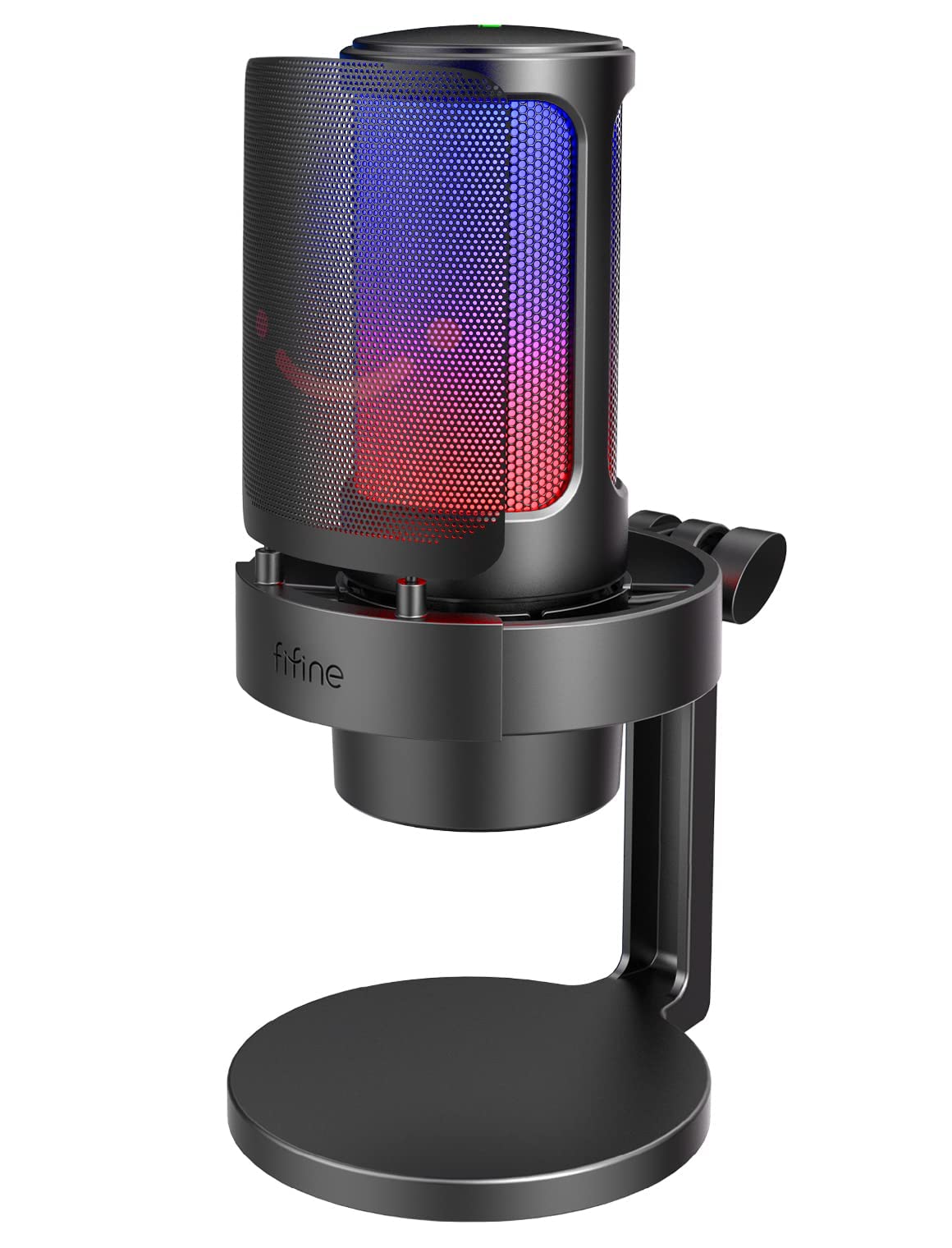
2,000+ ratings
Read Amazon ReviewsFIFINE AmpliGame A8
A convenient desktop microphone for gamers and streamers who want touch mute, headphone monitoring, adjustable RGB, and included noise-control accessories.
- USB desktop condenser microphone with a cardioid pickup pattern for voice-focused use.
- Three RGB lighting modes offer up to nine colors, selectable with the RGB control button.
- A 3.5 mm headphone jack supports audio monitoring, and a gain knob adjusts microphone volume.
- One-tap mute provides a quick way to pause microphone pickup.

Pros
- Useful on-mic controls for gain, mute, lighting, and headphone monitoring.
- Includes a pop filter and shock mount for common desktop recording nuisances.
Consider before buying
- The suggested 6-to-12-inch recording distance means you will need to position the mic within comfortable reach while speaking.
- Its standing desktop form is best suited to a desk; check your available space and preferred mic position before choosing it.
Read the full review summary
The AmpliGame A8 combines a condenser capsule and cardioid pickup pattern with practical controls directly on the microphone.
A headphone jack supports monitoring, a gain knob adjusts mic volume, and a single tap mutes the mic—useful when you want to make quick changes without reaching for computer controls.
It also includes a black metal pop filter, a compact shock mount, and a standing base.
These details make the package appealing for a desktop gaming or streaming setup, particularly for someone who wants an uncomplicated USB microphone with visual customization.
Its stated recording range is 6 to 12 inches, so placement and keeping the mic within reach should factor into your desk arrangement.
The buying factors
AmpliGame A8 Scorecard
Editorial scores reflect listed features and buyer fit; they are not laboratory measurements or customer ratings.
Desktop controls
The gain knob and one-tap mute make common adjustments accessible on the microphone itself.
Monitoring convenience
A 3.5 mm headphone jack supports listening while you check whether your voice sounds too quiet or harsh.
Voice-focused pickup
The condenser capsule and cardioid pattern are designed around vocal capture and reducing pickup from other directions.
Noise-control accessories
The included pop filter and shock mount address plosives and some desk or handling vibration.
Setup simplicity
The microphone is described as plug-and-play for PC, Mac, and PS5.
Lighting customization
Three modes offer up to nine RGB color options, with controls on the mic.
Key Features and Specifications of AmpliGame A8
- USB desktop condenser microphone with a cardioid pickup pattern for voice-focused use.
- Three RGB lighting modes offer up to nine colors, selectable with the RGB control button.
- A 3.5 mm headphone jack supports audio monitoring, and a gain knob adjusts microphone volume.
- One-tap mute provides a quick way to pause microphone pickup.
- Includes a black metal pop filter and compact shock mount to help soften plosives and dampen some vibration.
- Plug-and-play compatibility is listed for PC, Mac, and PS5; suggested recording distance is 6 to 12 inches.
Pros and Cons of AmpliGame A8
Pros
- Useful on-mic controls for gain, mute, lighting, and headphone monitoring.
- Includes a pop filter and shock mount for common desktop recording nuisances.
- USB setup is aimed at straightforward use across PC, Mac, and PS5.
- RGB options let the microphone coordinate with a gaming desk setup.
Consider before buying
- The suggested 6-to-12-inch recording distance means you will need to position the mic within comfortable reach while speaking.
- Its standing desktop form is best suited to a desk; check your available space and preferred mic position before choosing it.
- The description focuses on gaming, streaming, and general voice recording rather than detailing advanced recording controls or a broader studio setup.
Who Should Buy AmpliGame A8?
Good fit
Consider the AmpliGame A8 if you want a USB desktop mic with quick physical controls for gaming chat, streaming, online meetings, or casual voice recording.
The gain knob and touch mute are particularly convenient when you want to react to changing room or conversation conditions without navigating software.
The included pop filter and shock mount make it a practical all-in-one starting point for a desktop. Plan to speak from the suggested 6-to-12-inch range, and check that the base and mic position will fit your workspace.
It is also a good fit if RGB lighting is part of the appeal of your setup. Three modes and up to nine color choices offer some personalization without changing the microphone’s core voice-focused role.
Who should skip it
Skip it if your setup requires a microphone positioned well away from you; the suggested recording distance is relatively close, so a different placement style may suit your routine better.
Look elsewhere if you need a detailed feature set for advanced studio recording. The described strengths center on accessible desktop controls, gaming and streaming voice use, and included accessories.
How the AmpliGame A8 Fits a Desktop Recording Setup
Controls you can reach while speaking
The gain knob, headphone jack, and one-tap mute place several common tasks on the mic. That can simplify live chat and streaming, where adjusting level or muting quickly may be more convenient than switching to a computer menu.
Voice pickup and practical placement
A condenser capsule is intended to capture vocal detail, while the cardioid pattern is designed to favor sound from the front and reduce pickup from other directions, including some fan or vent noise.
The suggested 6-to-12-inch range is a useful setup guide: position the mic close enough for comfortable speaking, then check your monitoring level in the actual room.
Small accessories for a desktop environment
The pop filter is intended to soften plosive sounds, and the compact shock mount is meant to dampen vibration from a keyboard or contact with the desk.
These accessories address common sources of distraction in a desktop setup, though thoughtful placement still matters.
Lighting and setup fit
The A8’s three RGB modes and up-to-nine-color selection add visual flexibility for a gaming desk.
Its USB plug-and-play design is intended to keep setup simple on PC, Mac, and PS5; check that your intended device and desk arrangement match those needs before buying.
Alternatives to AmpliGame A8
No alternative model is recommended here. Compare the design and features that matter to your routine before choosing another option.
Is AmpliGame A8 Worth It?
The FIFINE AmpliGame A8 is worth considering as a desktop USB microphone for gaming, streaming, meetings, and casual voice recording.
Its strongest case is the combination of accessible gain, mute, and monitoring controls with a pop filter, shock mount, and adjustable RGB.
Choose it if you can keep the mic within its suggested 6-to-12-inch recording range and want a straightforward desktop setup.
If your priority is advanced studio recording or a very different microphone placement, assess those needs before settling on this model.
Your review at a glance
2,000+ ratings
Read Amazon ReviewsFIFINE AmpliGame A8
A convenient desktop microphone for gamers and streamers who want touch mute, headphone monitoring, adjustable RGB, and included noise-control accessories.
- USB desktop condenser microphone with a cardioid pickup pattern for voice-focused use.
- Three RGB lighting modes offer up to nine colors, selectable with the RGB control button.
- A 3.5 mm headphone jack supports audio monitoring, and a gain knob adjusts microphone volume.
- One-tap mute provides a quick way to pause microphone pickup.