The TP-Link USB WiFi 6 Adapter review centers on a desktop-focused way to add dual-band WiFi 6, adjustable high-gain antennas, and flexible positioning to a compatible PC.
Its appeal depends on having a suitable USB 3.0 port and a Windows 10 or 11 system, with Mac users needing to handle driver installation manually.
Archer TX20U Plus Review Summary
The quick verdict
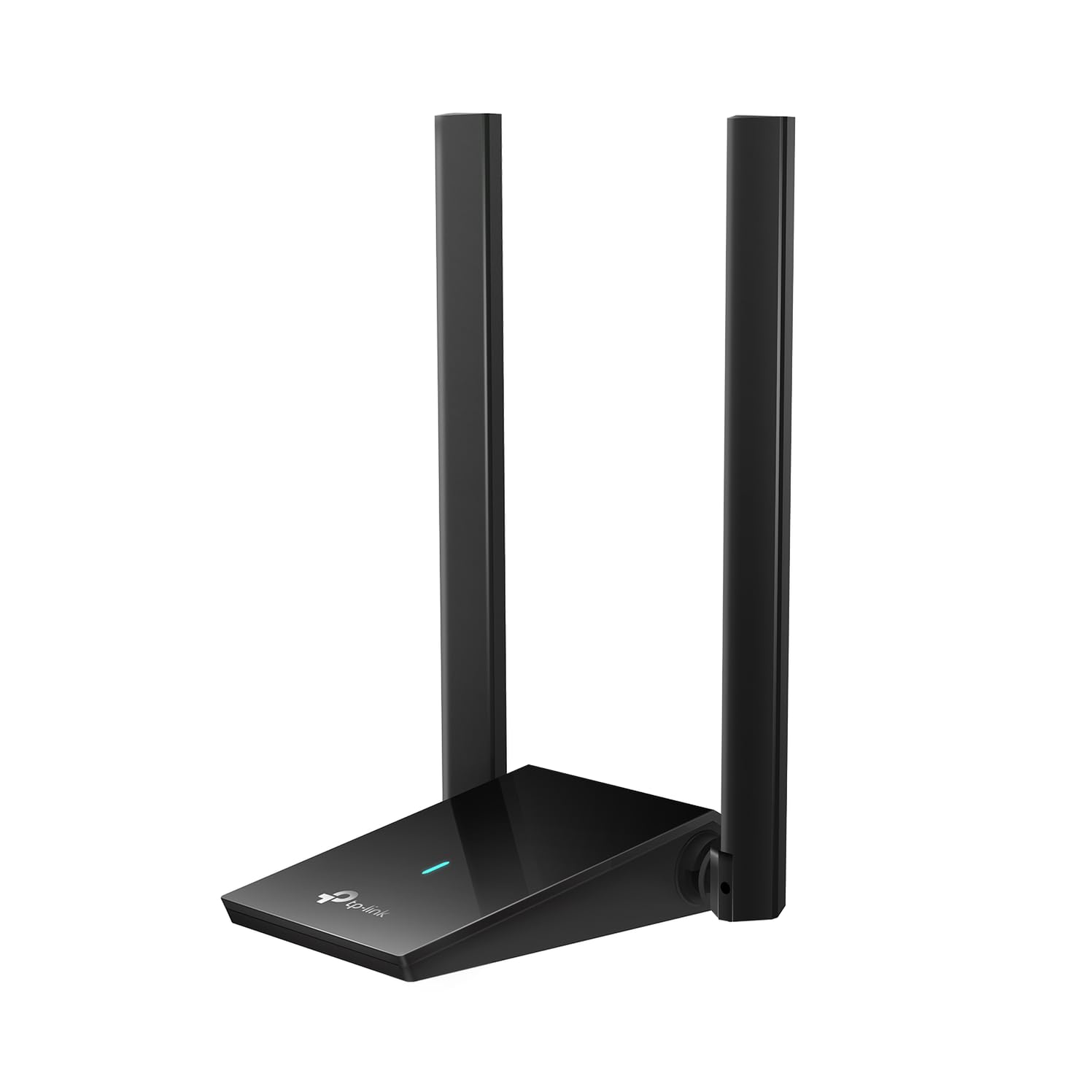
10,000+ ratings
Read Amazon ReviewsTP-Link Archer TX20U Plus
A practical fit for Windows desktop owners who want dual-band WiFi 6 and adjustable antennas with more placement flexibility.
- WiFi 6 / 802.11ax wireless networking in an AX1800 dual-band USB adapter.
- Supports up to 1201 Mbps on 5GHz and up to 574 Mbps on 2.4GHz.
- Two high-gain 5dBi antennas are adjustable and multidirectional.
- A one-meter USB 3.0 cable supports more flexible desktop placement; USB 3.0 is recommended for optimal performance.

Pros
- Combines current WiFi 6 features with support for both common WiFi bands.
- Adjustable antennas and a one-meter cable can help with positioning around a desktop setup.
Consider before buying
- The setup guidance recommends USB 3.0, so buyers should check available ports before choosing it.
- Mac OS requires manual driver upload, which may involve more setup than a plug-and-play expectation.
Read the full review summary
The Archer TX20U Plus combines WiFi 6 connectivity with separate 2.4GHz and 5GHz bands, two 5dBi high-gain antennas, and a one-meter USB 3.0 cable.
The cable and adjustable, multidirectional antenna design give desktop owners options for positioning the adapter away from the PC itself, which can be useful when the tower sits under a desk or in a crowded setup.
This model is best suited to someone upgrading a Windows 10 or 11 desktop that needs wireless networking or a more flexible adapter arrangement.
The AX1800 class and support for MU-MIMO and OFDMA make it feature-rich on paper, but the quoted band rates are maximum link speeds rather than a guarantee of real-world internet throughput.
Buyers should confirm their PC has USB 3.0 and that their router and broadband service can make use of the capabilities.
The buying factors
Archer TX20U Plus Scorecard
Editorial scores reflect listed features and buyer fit; they are not laboratory measurements or customer ratings.
Desktop placement flexibility
The one-meter USB 3.0 cable and adjustable multidirectional antennas give desktop users useful freedom to position the adapter.
Wireless feature set
WiFi 6, dual-band operation, MU-MIMO, and OFDMA provide a broad set of modern wireless features.
Band flexibility
It supports both 2.4GHz and 5GHz, allowing a choice based on the network and placement.
Peak link-rate class
The AX1800 class offers up to 1201 Mbps on 5GHz and up to 574 Mbps on 2.4GHz, subject to the network and conditions.
Setup convenience
Windows 10 and 11 are supported, while Mac OS requires manual driver upload and setup instructions call for disabling the PC’s internal WiFi first.
Security compatibility
WPA3 support is a useful modern security feature when paired with a compatible wireless network.
Key Features and Specifications of Archer TX20U Plus
- WiFi 6 / 802.11ax wireless networking in an AX1800 dual-band USB adapter.
- Supports up to 1201 Mbps on 5GHz and up to 574 Mbps on 2.4GHz.
- Two high-gain 5dBi antennas are adjustable and multidirectional.
- A one-meter USB 3.0 cable supports more flexible desktop placement; USB 3.0 is recommended for optimal performance.
- Supports WPA3, MU-MIMO, and OFDMA.
- Windows 10 and Windows 11 are listed as supported; Mac OS requires manual driver upload.
Pros and Cons of Archer TX20U Plus
Pros
- Combines current WiFi 6 features with support for both common WiFi bands.
- Adjustable antennas and a one-meter cable can help with positioning around a desktop setup.
- WPA3, MU-MIMO, and OFDMA add useful compatibility and network-management features.
- The documented Windows 10 and 11 support covers common desktop operating systems.
Consider before buying
- The setup guidance recommends USB 3.0, so buyers should check available ports before choosing it.
- Mac OS requires manual driver upload, which may involve more setup than a plug-and-play expectation.
- Maximum band rates do not predict actual internet speed; results depend on the router, service, signal conditions, and connected devices.
Who Should Buy Archer TX20U Plus?
Good fit
Consider the Archer TX20U Plus if a desktop PC needs a WiFi 6 adapter and you value the option to adjust antenna direction or place the unit via its one-meter cable.
It is a particularly sensible match for a tower whose built-in wireless reception is inconvenient to position, provided the computer has a USB 3.0 port.
It also makes sense when you want access to both 2.4GHz and 5GHz networks and your router supports WiFi 6 features.
Before buying, check the PC’s operating system and port availability, confirm whether the internal wireless adapter should be disabled during installation, and make sure the router can use WPA3 if that security option matters to you.
Who should skip it
Look elsewhere if you need a wireless adapter with a documented setup path that avoids manual driver handling on Mac OS. This model’s product information specifies Windows 10 and 11 support and notes manual driver upload for Mac.
It may not suit a PC with no available USB 3.0 port if you want to follow the recommended connection for optimal performance.
Also, don’t choose it based solely on the AX1800 label if your router or internet plan cannot take advantage of its wireless capabilities.
How the Archer TX20U Plus Fits a Desktop WiFi Upgrade
Positioning is central to the design
The one-meter USB 3.0 cable gives this adapter a practical advantage over a unit that must sit directly in a desktop’s port. Pairing that reach with two adjustable, multidirectional antennas lets the owner try different locations and orientations.
The design offers placement options, though the best position will depend on the room, PC location, and wireless network.
Dual bands serve different network conditions
The adapter can connect on 2.4GHz or 5GHz, with maximum rates of up to 574 Mbps and 1201 Mbps respectively. Those figures describe the adapter’s supported rates under suitable conditions, not guaranteed application or internet speeds.
A buyer should consider router capability and where the PC sits when deciding whether the 5GHz band’s higher listed ceiling or the alternative band better fits the setup.
WiFi 6 features need a compatible network
WiFi 6, MU-MIMO, and OFDMA are useful specifications for a modern wireless environment, while WPA3 adds support for a newer security protocol. Their practical value depends on the router and network configuration as well as the adapter.
Checking the router’s supported standards and security options before purchase can clarify which features will be available.
Compatibility and installation merit a quick check
The stated operating system support covers Windows 10 and Windows 11, including 32-bit and 64-bit versions.
Setup guidance recommends a USB 3.0 port and says to disable the computer’s internal WiFi before installing; Mac OS involves manual driver upload.
These details make it worth checking the PC’s ports and comfort with driver setup before ordering.
Alternatives to Archer TX20U Plus
No alternative model is recommended here. Compare the design and features that matter to your setup before choosing another option.
Is Archer TX20U Plus Worth It?
The TP-Link Archer TX20U Plus is worth considering for a Windows desktop owner who wants a WiFi 6 upgrade with adjustable antennas and cable-assisted placement.
Its dual-band support, WPA3 compatibility, and MU-MIMO and OFDMA features give it a useful modern feature set.
Check that your PC has USB 3.0 and that the setup requirements suit your system, especially if you use Mac OS.
Treat the band-rate figures as maximums and choose this adapter for the combination of WiFi 6 capability and desktop positioning flexibility, not as a promise of a particular internet speed.
Your review at a glance
10,000+ ratings
Read Amazon ReviewsTP-Link Archer TX20U Plus
A practical fit for Windows desktop owners who want dual-band WiFi 6 and adjustable antennas with more placement flexibility.
- WiFi 6 / 802.11ax wireless networking in an AX1800 dual-band USB adapter.
- Supports up to 1201 Mbps on 5GHz and up to 574 Mbps on 2.4GHz.
- Two high-gain 5dBi antennas are adjustable and multidirectional.
- A one-meter USB 3.0 cable supports more flexible desktop placement; USB 3.0 is recommended for optimal performance.